Download & install
Install the launcher CIA once with a QR code; build the game files in the converter. The offline converter runs on your PC.
Launcher
Updating only takes the launcher. Existing .neo3ds files keep working on a new version. Per-game CIAs must be converted again; quick saves from another version cannot be loaded.
The game-list app. Install it once, then put .neo3ds files on the SD card and pick them from the list. Only one HOME menu icon is added.
Install with a QR code
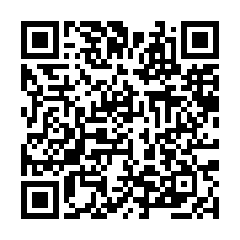
FBI → Remote Install → Scan QR Code.
Downloads the latest launcher CIA (about 400 KB).
The 3DS needs an internet connection (2.4 GHz Wi-Fi).
It does not have to be on the same network as the PC.
Install from the SD card
If the QR fails, copy neo3ds-launcher.cia to the SD card and install it in FBI (SD → the file → Install CIA).
Per-game install
To use per-game CIAs instead, copy the .cia to the SD card and install it in FBI (SD → the file → Install CIA). A game shares its key config, backup RAM and quick saves between its CIA and the launcher.
Offline converter
Convert on your PC without a browser. No .NET runtime to install; keep the unpacked folder together.
macOS builds are Apple Silicon only. On an Intel Mac, use the browser converter.
More
- Changelog — what changed in each version
- GitHub releases — every download file
- Manual — launcher controls and key config