neo3ds manual
Install and update from the download page.
Launcher
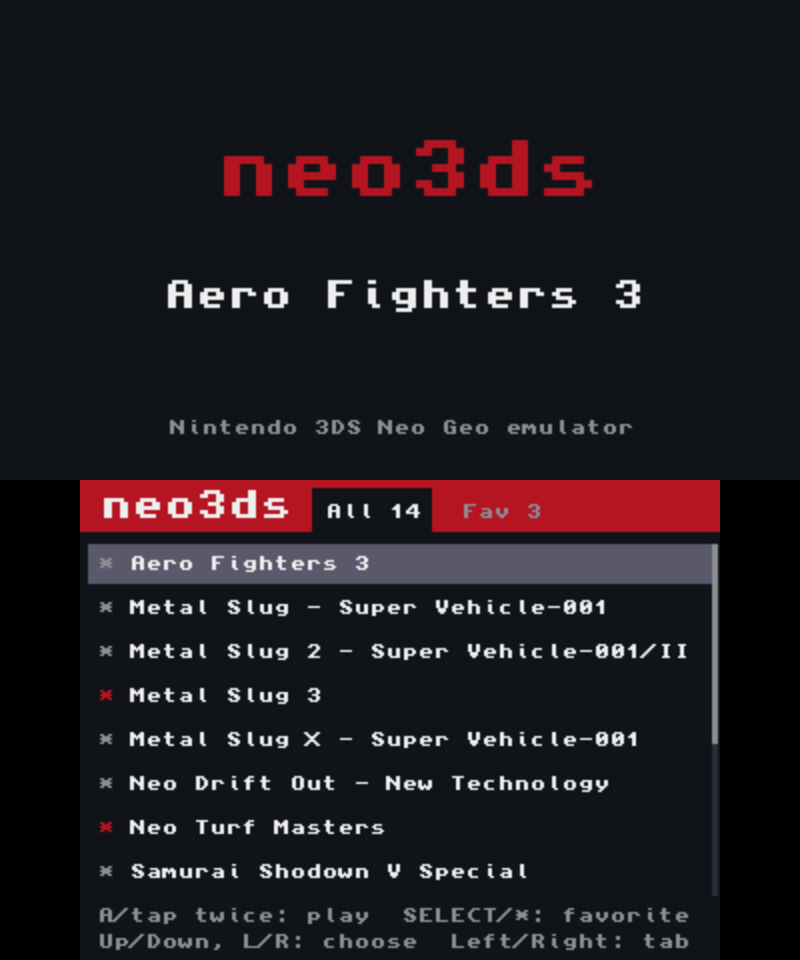
- Pick a gameUp/Down (L/R for a page) or touch to pick; A or a double tap to start.
- FavoritesSELECT or a tap on the
*at the left of a game adds or removes it. Left/Right or the tabs switch between All and Fav. - Back to the listIn a game, tap [Game list] on the bottom screen twice.
Controls
These are the defaults; Key config changes them per game.
Game input
| 3DS | Neo Geo |
|---|---|
| D-pad | Joystick |
| B / A / Y / X | A / B / C / D |
| SELECT / START | Coin / Start |
System and shortcuts
| 3DS | Neo Geo |
|---|---|
| R + B / A / Y / X | Turbo on/off |
| SELECT + L / SELECT + R | Quick save / quick load |
| Hold SELECT + START for 1 s | Restart the game |
The bottom screen shows the current layout in the arcade panel colours (A red, B yellow, C green, D blue), with the game title and fps at the top.
Bottom screen
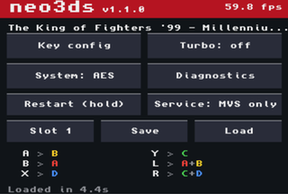
Key config
Opens the key config screen (the game pauses)
Turbo
Each tap moves turbo off → A → B → X → Y
System
Switches between the home (AES) and arcade (MVS) BIOS. Tap twice; the game restarts on it
Diagnostics
fps, per-core time and memory use, once a second. Touch to go back
Restart
Hold until the yellow bar fills. Like switching the console off and on (cartridge saves are kept)
Service
MVS BIOS service menu (difficulty, credits, hardware tests). MVS only
Slot / Save / Load
Quick save: pick slot 1-3, save, load (tap twice)
Game list
From the launcher only: tap twice to go back to the list
⏻
Turns the bottom screen's backlight off; touch anywhere to turn it back on (that touch presses nothing)
Key config
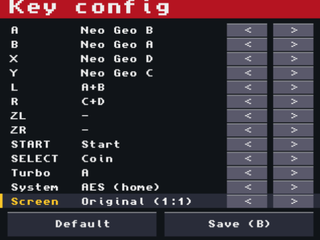
- A / B / X / Y / L / R / ZL / ZR / START / SELECT can each press Neo Geo A-D, a combination (A+B, C+D, B+C, A+B+C, B+C+D, A+B+C+D), Start or Coin. For example in KOF: L = A+B (dodge), R = C+D (blowback).
- Tap
<>at the end of a line, or Up/Down then Left/Right. The turbo button is set here too. - System switches the BIOS (saving restarts the game). On MVS, press SELECT for a coin before starting.
- Screen:
Original (1:1)shows the 304×224 picture as is;Full (stretched)fills the 400×240 top screen (about 1.3× wider, 1.07× taller, so some pixels show twice as wide). - B or
Save (B)saves and returns;Defaultrestores the defaults. Settings are kept per game.
Turbo
Hold R and press A, B, X or Y to make it the turbo button (the same button again turns it off). Held down, it fires 20 times a second; single taps still fire once. R + button lasts for the session; set it in Key config to keep it.
Saves
Quick save
Three slots per game hold the exact game state. A slot saved on the other BIOS switches to it before loading.
Backup RAM
On the MVS BIOS, the board's settings, high scores and ranking initials are saved to the SD card when they change, and straight away on HOME, close or sleep.
Where things are saved
| File | SD card path |
|---|---|
| Key config | /3ds/neo3ds/keys/<title ID>.bin |
| Backup RAM | /3ds/neo3ds/saves/<title ID>.sram |
| Quick saves | /3ds/neo3ds/states/<title ID>.1 ~ .3 |
| Launcher game files | /neo3ds/games/*.neo3ds |
| Launcher favorites | /3ds/neo3ds/launcher.txt |
The title ID comes from the romset (zip) name, so rebuilding from the same zip or starting the game from the launcher uses the same files.